ASUS ProArt PA279CRV 27-inch 4K HDR Monitor Review
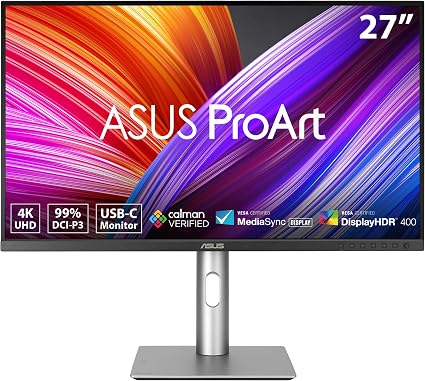
A factory-calibrated 4K IPS panel with 99% DCI-P3, USB-C with 96W power, and Calman Verified out of the box. The PA279CRV is a creator's daily driver.
Affiliate Disclosure: This page contains affiliate links. If you make a purchase through these links, we may earn a small commission at no additional cost to you. This helps support our site and allows us to continue providing free content. We only recommend products we believe in.
TL;DR
The ASUS ProArt PA279CRV is a 27-inch 4K (3840 x 2160) IPS monitor designed for creative professionals. It is factory-calibrated to a Delta-E < 2, covers 99% DCI-P3 / 99% Adobe RGB, and includes USB-C with 96W power delivery so a laptop docks with one cable.
Why It Matters
For color-critical work — photo editing, video grading, illustration, design — uncalibrated monitors silently lie about your output. The ProArt line ships with a calibration report in the box, which means you start with accurate color instead of fighting your screen for a week before trusting it.
Key Specs
- 27-inch IPS, 3840 x 2160 (4K UHD)
- Color: 99% DCI-P3, 99% Adobe RGB, 100% sRGB, 100% Rec. 709
- Calman Verified, factory-calibrated Delta-E < 2
- HDR10, VESA DisplayHDR 400
- USB-C with 96W power delivery
- HDMI 2.0 x 2, DisplayPort 1.4 x 1
- Hardware calibration support
- Full ergonomic stand: tilt, swivel, pivot, height
Pros
- Out-of-box accuracy is genuinely useable for client work
- USB-C 96W charges most laptops while driving the display
- 99% Adobe RGB matters for print workflows
- Pivot to portrait mode is great for code or long documents
- Built-in color modes for sRGB, Adobe RGB, DCI-P3, Rec. 709
Cons
- 60Hz refresh rate — not for high-refresh gaming
- HDR400 is technically HDR but visually mild
- Reflective coating less matte than older ProArt models
- USB-C is a single-stream — no daisy-chain DP-out
Who It's For
Photographers, video editors, illustrators, designers, and anyone whose output gets judged on color accuracy. Also a strong fit for laptop users who want a single-cable dock-and-charge setup. Gamers and pure productivity users will find better refresh-rate value elsewhere.
How to Use It
Use the included USB-C cable to laptop — one cable handles display, audio, USB hub, and 96W charging. Pick the color mode for the project (sRGB for web, Adobe RGB for print, DCI-P3 for video). If you have a hardware calibrator like a SpyderX or i1Display, recalibrate every 3 months and store the profile in the monitor itself, not the OS.
How It Compares
Versus the BenQ PD2700U, the PA279CRV is more accurate, faster on USB-C power, and slightly pricier. Versus the Apple Studio Display, the ProArt costs less, supports more color spaces, and runs natively on Windows and Linux. For creative work outside the Apple ecosystem, the ProArt is the safer pick.
Bottom Line
A factory-calibrated 4K monitor with proper USB-C docking is the boring, correct upgrade for creative work. The PA279CRV nails both for less than the obvious premium alternatives.
Featured Products
ASUS ProArt Display 27” 4K HDR Professional Monitor (PA279CRV) - IPS, UHD (3840 x 2160), 99%
Related Articles

Rain Design mStand Laptop Stand Review: Is the Classic Still Worth It in 2026?
Is the Rain Design mStand still worth roughly $45 in 2026? Our review breaks down its single-piece aluminum build, fixed-height ergonomics, cable management, and how it compares to adjustable and folding laptop stands.

Logitech Brio 101 Full HD 1080p Webcam Review
The Brio 101 is Logitech's no-fuss meeting camera — 1080p, plug-and-play, auto-light correction, and a price that makes upgrading the laptop cam easy to justify.

Anker PowerConf C200 2K Webcam Review
Step up from 1080p without going full 4K. The Anker PowerConf C200 delivers crisp 2K video, a real privacy shutter, and stereo mics for less than most flagship webcams.